Kaboom: Return of Kaboom
This project took 8 weeks, during which I worked in a team together with 11 other games students. The team consisted of 3 designers, 5 artists and 4 programmers, all from Breda University of Applied Sciences. The focus of the project was on teamwork and collaboration.
The game was made using Unreal Engine and we used the agile scrum method to manage the project. You can check out our itch.io page and download/play the game using the following link: Kaboom: Return of Kaboom.
My work
My main focus this project as a programmer was helping the team to create the game. Making gameplay related features according to the vision of the designers. Some of the things I did were:
- Talking with designers;
- Understanding their visions;
- Implementing these visions into the gameplay features;
- Iterating on the features I created, to improve the gameplay experience.
This project sparked my interest in collaborating with designers and creating a satisfying gameplay experience. Being able to implement the designer’s vision into the behaviour of NPCs was incredibly enjoyable.
Below are some of the features I worked on:
- Neural network (NN) trained for pathfinding of enemy NPC airplanes;
- Interactions between the player and enemy NPC airplanes;
- Patrol behaviour for enemy NPC airplanes.
The same NN I made is also used for the bombers in the game, with a different target and interaction with player.
NN for pathfinding of enemy NPC airplanes
One of the biggest features of the gameplay loop are the enemy NPC airplanes that defend the factories the player is attacking. It was my job to make the pathfollowing of these airplanes, I decided to do this using NNs because it was a research topic I could choose and it seemed quite interesting. To train the NN, I made a training environment in which the airplanes were trained by making them fly towards the center.
I made use of an Unreal Engine plugin called Learning Agents, which contains different components and a manager to make them all work together. These components are:
- The interactor: Is responsible for interacting with the agent, by gathering observations and applying actions. The interactor replaces the get state and part of the step functions from the plugin;
- The trainer: Gathers the rewards for the actions performed, manages when an agent is finished and what happens to the agent once it is finished. The trainer replaces the get reward, is done and reset functions from the plugin;
- The manager: Is responsible for connecting all the seperate parts together, loading the neural network data and deciding whether to train or not. The manager replaces the inferencer and single agent connector from the Unray plugin.
The interactor is used for interacting with the agent. To set up the interactor, there are a couple of functions that have to be overridden: specify observation; specify action; gather observation; perform action. Below you can see the blueprints of the gather observation and perform action functions.
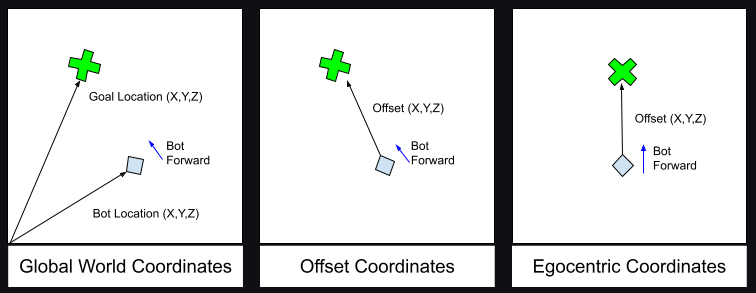
The gather observation function is the code that is executed to determine the input for the neural network. The velocity is very straight forward, take the agent and get the velocity from the agent. For the position of the target there are some calculations that happen, to make sure the target position is set in a coordinate space that is most useful for the agent.

The goal for the agent is to move towards its target location, so it makes sense to use this location as input for the neural network. However that does not mean the target location has to be used as is, there are modifications that can be used to transform the target location to a coordinate space that is much easier to use for a neural network. The original coordinate space the target location is set in, is the global world coordinate space. If the location of this coordinate space is to be used, it will require extra input for the agent’s own location and transform. Which will result in the neural network having more input nodes, and making the neural network more complex by adding more degrees of freedom. To prevent the neural network from becoming more complicated, but still use all the necessary information the target location can be transformed from the global world coordinate space to the egocentric coordinate space (see the image below).

The benefits to making this translation to the goal location, is not only prevent adding more degrees of freedom, but it will also make the performance of the NN more robust.
The actions for the NN are: throttle and steering. In the perform action function they are applied to the agent, this is done by finding the action in the output of the neural network, where the actions are labeled: steering and throttle. All that needs to happen now is to apply these actions to the agent, this done using functions that are a part of the custom agent. In the perform action function are two branches, the top branch handles the steering action and the bottom branch handles throtlle.


Now that the interactor is set up, the neural network can interact with agents assigned to it. To train a neural network, the trainer needs to be set up as well. The functions that have to be set up are: gather agent reward; gather agent completion; and reset agent.
The gather agent reward function is one of the most important parts of reinforcement learning (RL), because the agents will try to learn the behaviour they are rewarded for here. It is desired for the airplanes to move closer to their target and if they get close enough (distance to the target below a certain threshold), they will circle the target. The circling is part of the attack behaviour of the airplanes, but also allows for patrolling. It would be weird for an airplane to reach a target destionation and immediately stop moving, it is an airplane and should continue to move. In our case the airplane will circle the target destination once close enough.

The gather agent completion function is a way to stop an agent from continuing the training, because it has already done something it is not supposed to do and continuing this episode is a waste of time. The airplane agent will stop with its current episode if it leaves the boundaries of the map (only present in the training environment).

You can see the trained NN in action, in the video below. No matter where the airplanes are spawned, they will start moving towards the center and start circling around it. The green lines are the lines of sight of the airplanes, which is to check if the player is in front of them (it doesn’t do anything in the training environment). They can be used to see the direction in which the airplanes are flying.
Interactions between the player and enemy NPC airplanes
Now that the enemy NPC airplanes can move towards a target and start circling it, we can set the player as that target and make the airplanes interact with the player.
When the airplanes are close enough to the target and start circling it, I added some logic that will align the forward vector of the airplane with the direction the player is in (at an interval). Resulting in the airplanes occasionally flying toward the player.
After adding the at interval alignment of the airplanes to the player, I added a shooting mechanic. Which was a very simple: spawn bullet, that moves in the forward direction at the time of spawning. In the video below you can see all of this work together in-game.
If the player flies away, the airplanes’s radars will still see the player and their target is continuously set to the player location (as long as the player is within a certain range). This will cause the airplanes to chase the player. If the player is out of range, the airplanes will patrol (circle) the last known location of the player for some time, before returning to the airport where they spawned.