Particle Based Fluid Simulation
My Work
- Implementation of complex Navier-Stokes physics equations
- Improving performance with spatial lookup
- Unreal engine (UE) physics object detection and resolution
- UE GPU impplementation of the particle simulation
- Setting up plugin usability
You can check out a blogpost I made on this project using the following link: Real-Time Particle Based Fluid Simulation Plugin for Unreal Engine. This project was made in Unreal Engine 5.5, where the simulation was developed mostly in C++ and hlsl compute shaders.
Physics Equations
I use Navier-Stokes equation for simulating the behaviour of fluids using particles. This equation consists of 3 different parts:
- Pressure forces
- External forces
- Viscosity forces
In the video you can see that the pressure causes the particles to move away from the center where they start clumped up together. At the end the particles have mostly settled and the distance between particles is determined by the pressure forces. There is only gravity being applied as an external force, so not much to see other then the partciles settling at the bottom of the bounding box. The viscosity is what lets partciles adjust to their surroundings more quickly, in the video you can see this in how the different colors are moving through the simulation in patches.
Spatial Lookup
There are a lot of loops over all particles that happen in all 3 parts of the Navier-Stokes equation when applied to particles, which is suboptimal at best when trying to create real-time interaction. Luckily for us, there are ways to massively speed this up. There is a spatial lookup algorithm that only looks at the relevant particles in range when doing the physics calculations and excludes all of the distance checks for the particles that are guarenteed to be too far away.
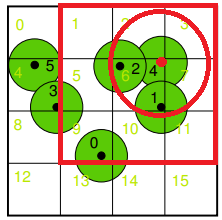
Lets look at a 2D example for simplicity, we have a rectangle that contains all particles in a volume. The rectangle can be split into cells creating a uniform grid. All of these cells can be given an index (the light green numbers). The particles have indices as well, allowing for the storage of particle indices into cells. Thus giving direct acces to particles within a cell. If the size of the cells is set to the radius of the smoothing kernel (maximum distance that particles impact each other), then we can easily find all particles close enough to impact the calculations of particle i (the particle we are calculating the forces for). All we have to do is loop over 9 cells in the 2D grid to get all relevant particles. This can then be expanded to 3D, where 27 cells give all particles in range.
A limitation of this spatial lookup algorithm on the GPU is the limited memory we have and that we have to assign the size of buffers before actually filling them. There are ways around this and the one I use is to use duplicate cell IDs after reaching a certain limit. This will mean that sometimes the algorithm returns particles in a cell with the same ID that is in a completely different part of the volume. However, these particles will not impact the calculations, because they will not pass the distance check. This is something we have to live with when simulating an infinite space with finite memory.
Physics Object Detection And Resolution
Making the fluid simulation interactive is a big focus of my project, and this includes collision detection and resolution. Unreal Engine has 3 primitive collision shapes: Box, Sphere and Capsule. The plugin currently supports all three of these shapes. Below we will take a closer look at how this is accomplished per shape.
In the videos you can see a red box and lines, which are for debugging purposes. The overlapping box shows the area that is checked against the volume box, to determine the area that is possibly colliding. All particles in the cells of this overlapping area are checked against the actual box and if they are colliding it will resolve it. The colliding particles are shown in the video with the red lines in the direction the particles are displaced.
In the box collision video you can see a showcase of the box collision resolution in the real-time simulation. The box object gets detected correctly and the collision gets resolved for all particles, creating a displacement in the fluid. This displacement causes ripples to go through the fluid that are shown by the velocity of particles carrying over to each other (you can see this with the color of the particles), while stabalizing over time.
In the sphere collision video you can see a showcase of the sphere collision resolution in the real-time simulation. Again you can see that the object gets detected correctly and the resolution causes ripples through the fluid that deteriorate over time. It was quite difficult to get collision to correctly resolve for spheres scaled differently across the axii. This transform creates an ellipsoid, which is more complex to resolve then a sphere. To solve this we can detect and resolve the collision in the local space of the unit sphere (radius = 1). With the transform of the overlapping sphere (ellipsoid) we can transform the possibly colliding particle locations to the local space of the unit sphere, and determine the detection and calculate the displacement there, before transforming this back into local space of the fluid volume.
In the capsule collision video you can see a showcase of the capsule collision resolution in the real-time simulation. Again you can see that the object gets detected correctly and the resolution causes ripples through the fluid that deteriorate over time. Capsules are interesting objects to resolve collisions for, because they consist of a cylinder and two hemispheres at the ends. The radius of the hemispheres is by default the same as the radius of the cylinder. In a technical sense it is described by a cylinderheight and radius, this is all the information required to determine collisions. To resolve these collisions you can determine the closestpoint to the center line of the cylinder and use sphere collision resolution to resolve the collision.
UE Plugin Usability
Unreal Engine is a very big engine, that has been developed since 1995. As you can probably imagine, to develop something like this you need a structure to keep so the engine doesn’t fall apart. So when creating this plugin I had to learn a lot about UEs structure and how to expand on it. The most important parts for this plugin is to contain the fluid volume to components, so these components can be added to actors and placed in the world.
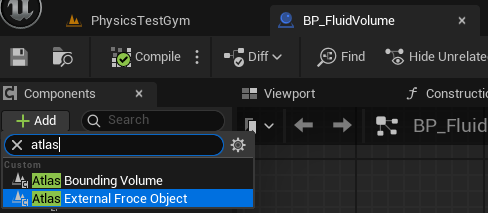
This always user to add the bounding fluid component to their actors. In the attached image you can see that you can very easily add the plugin components to an actor. To simplify finding components from the plugin, we gave it a name (Atlas), which you can use to find all components from the plugin.
A lot of settings have been made adjustable in blueprints, so users can play around with and customize the simulation to their wants and needs. These variables are set to a default that will give a similar result to the videos showcasing the simulation running on the GPU (at the top of the page). Again the variable sections related to the plugin are labeled with Atlas. The most interesting variables are the number of particles, as you will need to increase this if you want a larger volume but similar filling.
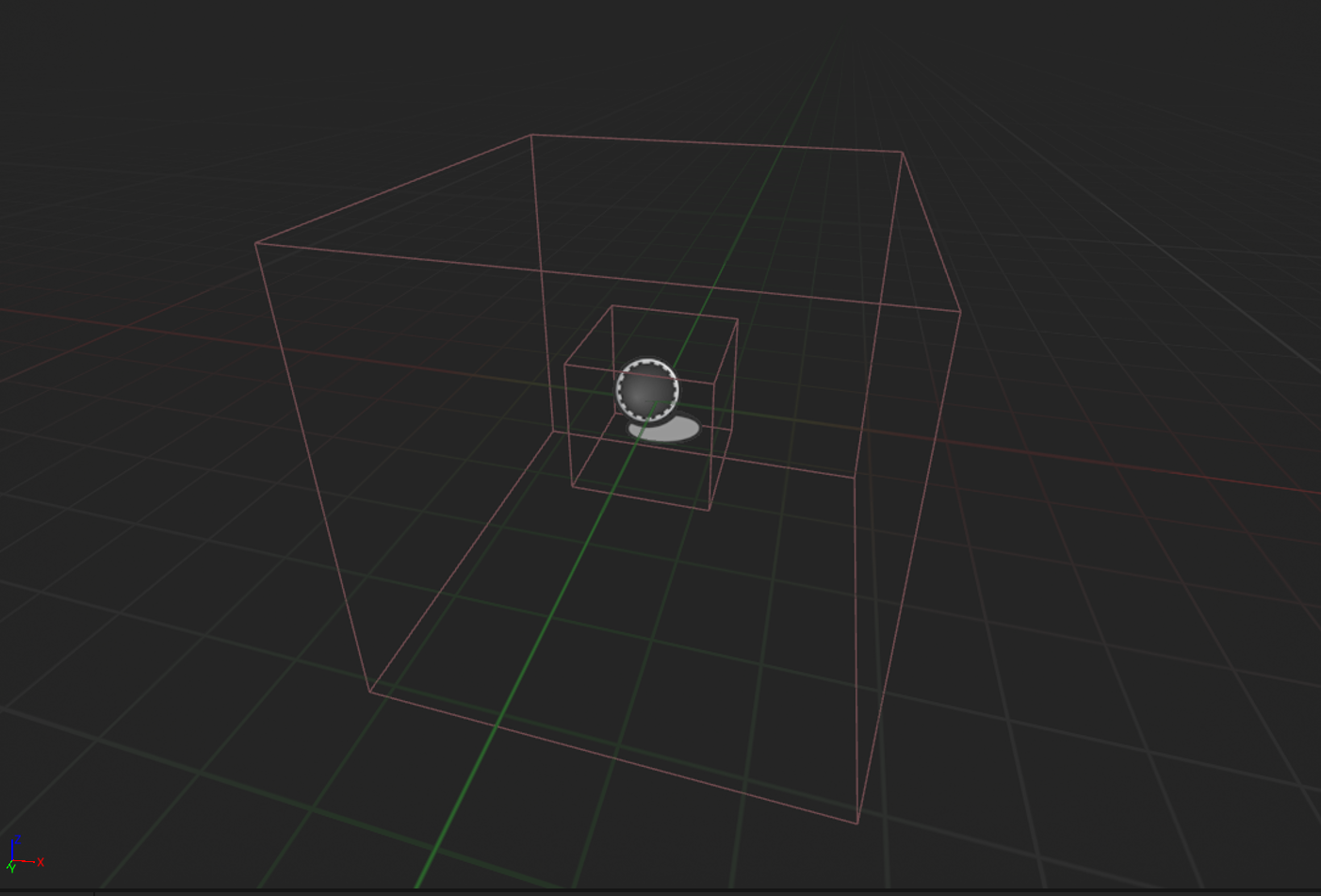
To give the user an idea of the size of the volume and where the simulation is contained to, in the viewport image you can see the box that outlines the volume. You can also see a smaller box inside, which is the location that the particles will be spawned at. The user can freely scale, rotate and move these boxes around to create the situation they want.